
Course 6 - The nuts and bolts of machine learning
Your team is close to completing their user churn project. Previously, you completed a project proposal, and used Python to explore and analyze Waze’s user data, create data visualizations, and conduct a hypothesis test. Most recently, you built a binomial logistic regression model based on multiple variables.
Leadership appreciates all your hard work. Now, they want your team to build a machine learning model to predict user churn. To get the best results, your team decides to build and test two tree-based models: random forest and XGBoost.
Your work will help leadership make informed business decisions to prevent user churn, improve user retention, and grow Waze’s business.
In this activity, you will practice using tree-based modeling techniques to predict on a binary target class.
The purpose of this model is to find factors that drive user churn.
The goal of this model is to predict whether or not a Waze user is retained or churned.
This activity has three parts:
Part 1: Ethical considerations
Consider the ethical implications of the request
Should the objective of the model be adjusted?
Part 2: Feature engineering
Part 3: Modeling
Follow the instructions and answer the questions below to complete the activity. Then, you will complete an Executive Summary using the questions listed on the PACE Strategy Document.
Be sure to complete this activity before moving on. The next course item will provide you with a completed exemplar to compare to your own work.
Throughout these project notebooks, you'll see references to the problem-solving framework PACE. The following notebook components are labeled with the respective PACE stage: Plan, Analyze, Construct, and Execute.

Consider the questions in your PACE Strategy Document to reflect on the Plan stage.
In this stage, consider the following questions:
What are you being asked to do?
What are the ethical implications of the model? What are the consequences of your model making errors?
==> ENTER YOUR RESPONSES TO QUESTIONS 1-4 HERE
Import packages and libraries needed to build and evaluate random forest and XGBoost classification models.
# Import packages for data manipulation
import pandas as pd
import numpy as np

# Import packages for data visualization
import matplotlib.pyplot as plt
import seaborn as sns

# This lets us see all of the columns, preventing Juptyer from redacting them.
pd.set_option('display.max_columns', None)

# Import packages for data modeling
from sklearn import metrics
from sklearn.model_selection import GridSearchCV, train_test_split
from sklearn.ensemble import RandomForestClassifier
from xgboost import XGBClassifier

# This is the function that helps plot feature importance
from xgboost import plot_importance

# This module lets us save our models once we fit them.
import pickle
Now read in the dataset as df0 and inspect the first five rows.
Note: As shown in this cell, the dataset has been automatically loaded in for you. You do not need to download the .csv file, or provide more code, in order to access the dataset and proceed with this lab. Please continue with this activity by completing the following instructions.
# Import dataset
df0 = pd.read_csv('waze_dataset.csv')
# Inspect the first five rows
### YOUR CODE HERE ###

df0.head()
| ID | label | sessions | drives | total_sessions | n_days_after_onboarding | total_navigations_fav1 | total_navigations_fav2 | driven_km_drives | duration_minutes_drives | activity_days | driving_days | device | |
|---|---|---|---|---|---|---|---|---|---|---|---|---|---|
| 0 | 0 | retained | 283 | 226 | 296.748273 | 2276 | 208 | 0 | 2628.845068 | 1985.775061 | 28 | 19 | Android |
| 1 | 1 | retained | 133 | 107 | 326.896596 | 1225 | 19 | 64 | 13715.920550 | 3160.472914 | 13 | 11 | iPhone |
| 2 | 2 | retained | 114 | 95 | 135.522926 | 2651 | 0 | 0 | 3059.148818 | 1610.735904 | 14 | 8 | Android |
| 3 | 3 | retained | 49 | 40 | 67.589221 | 15 | 322 | 7 | 913.591123 | 587.196542 | 7 | 3 | iPhone |
| 4 | 4 | retained | 84 | 68 | 168.247020 | 1562 | 166 | 5 | 3950.202008 | 1219.555924 | 27 | 18 | Android |

Consider the questions in your PACE Strategy Document to reflect on the Analyze stage.
You have already prepared much of this data and performed exploratory data analysis (EDA) in previous courses. You know that some features had stronger correlations with churn than others, and you also created some features that may be useful.
In this part of the project, you'll engineer these features and some new features to use for modeling.
To begin, create a copy of df0 to preserve the original dataframe. Call the copy df.
# Copy the df0 dataframe
### YOUR CODE HERE ###

df = df0.copy()
Call info() on the new dataframe so the existing columns can be easily referenced.
### YOUR CODE HERE ###

df.info()
<class 'pandas.core.frame.DataFrame'>
RangeIndex: 14999 entries, 0 to 14998
Data columns (total 13 columns):
 #   Column                   Non-Null Count  Dtype
---  ------                   --------------  -----
 0   ID                       14999 non-null  int64
 1   label                    14299 non-null  object
 2   sessions                 14999 non-null  int64
 3   drives                   14999 non-null  int64
 4   total_sessions           14999 non-null  float64
 5   n_days_after_onboarding  14999 non-null  int64
 6   total_navigations_fav1   14999 non-null  int64
 7   total_navigations_fav2   14999 non-null  int64
 8   driven_km_drives         14999 non-null  float64
 9   duration_minutes_drives  14999 non-null  float64
 10  activity_days            14999 non-null  int64
 11  driving_days             14999 non-null  int64
 12  device                   14999 non-null  object
dtypes: float64(3), int64(8), object(2)
memory usage: 1.5+ MB
km_per_driving_day¶Create a feature representing the mean number of kilometers driven on each driving day in the last month for each user. Add this feature as a column to df.
Get descriptive statistics for this new feature
# 1. Create `km_per_driving_day` feature
### YOUR CODE HERE ###

df['km_per_driving_day'] = df['driven_km_drives'] / df['driving_days']
# 2. Get descriptive stats
df['km_per_driving_day'].describe()
count    1.499900e+04
mean              inf
std               NaN
min      3.022063e+00
25%      1.672804e+02
50%      3.231459e+02
75%      7.579257e+02
max               inf
Name: km_per_driving_day, dtype: float64
Notice that some values are infinite. This is the result of there being values of zero in the driving_days column. Pandas imputes a value of infinity in the corresponding rows of the new column because division by zero is undefined.
Convert these values from infinity to zero. You can use np.inf to refer to a value of infinity.
Call describe() on the km_per_driving_day column to verify that it worked.
# 1. Convert infinite values to zero
### YOUR CODE HERE ###
df.loc[df['km_per_driving_day']==np.inf, 'km_per_driving_day']=0
# 2. Confirm that it worked
df['km_per_driving_day'].describe()
count    14999.000000
mean       578.963113
std       1030.094384
min          0.000000
25%        136.238895
50%        272.889272
75%        558.686918
max      15420.234110
Name: km_per_driving_day, dtype: float64
percent_sessions_in_last_month¶Create a new column percent_sessions_in_last_month that represents the percentage of each user's total sessions that were logged in their last month of use.
Get descriptive statistics for this new feature
# 1. Create `percent_sessions_in_last_month` feature
df['percent_sessions_in_last_month'] = df['sessions'] / df['total_sessions']

# 1. Get descriptive stats
df['percent_sessions_in_last_month'].describe()
count    14999.000000
mean         0.449255
std          0.286919
min          0.000000
25%          0.196221
50%          0.423097
75%          0.687216
max          1.530637
Name: percent_sessions_in_last_month, dtype: float64
professional_driver¶Create a new, binary feature called professional_driver that is a 1 for users who had 60 or more drives and drove on 15+ days in the last month.
Note: The objective is to create a new feature that separates professional drivers from other drivers. In this scenario, domain knowledge and intuition are used to determine these deciding thresholds, but ultimately they are arbitrary.
To create this column, use the np.where() function. This function accepts as arguments:
Example:
x = [1, 2, 3]
x = np.where(x > 2, 100, 0)
x
array([  0,   0, 100])
# Create `professional_driver` feature
df['professional_driver '] = np.where((df['drives']> 60) & (df['driving_days'] > 15) ,1 ,0)
total_sessions_per_day¶Now, create a new column that represents the mean number of sessions per day since onboarding.
# Create `total_sessions_per_day` feature
df['total_sessions_per_day'] = df['total_sessions'] / df['n_days_after_onboarding']
As with other features, get descriptive statistics for this new feature.
# Get descriptive stats
df.describe()
| ID | sessions | drives | total_sessions | n_days_after_onboarding | total_navigations_fav1 | total_navigations_fav2 | driven_km_drives | duration_minutes_drives | activity_days | driving_days | km_per_driving_day | percent_sessions_in_last_month | professional_driver | total_sessions_per_day | |
|---|---|---|---|---|---|---|---|---|---|---|---|---|---|---|---|
| count | 14999.000000 | 14999.000000 | 14999.000000 | 14999.000000 | 14999.000000 | 14999.000000 | 14999.000000 | 14999.000000 | 14999.000000 | 14999.000000 | 14999.000000 | 14999.000000 | 14999.000000 | 14999.000000 | 14999.000000 |
| mean | 7499.000000 | 80.633776 | 67.281152 | 189.964447 | 1749.837789 | 121.605974 | 29.672512 | 4039.340921 | 1860.976012 | 15.537102 | 12.179879 | 578.963113 | 0.449255 | 0.156477 | 0.338698 |
| std | 4329.982679 | 80.699065 | 65.913872 | 136.405128 | 1008.513876 | 148.121544 | 45.394651 | 2502.149334 | 1446.702288 | 9.004655 | 7.824036 | 1030.094384 | 0.286919 | 0.363319 | 1.314333 |
| min | 0.000000 | 0.000000 | 0.000000 | 0.220211 | 4.000000 | 0.000000 | 0.000000 | 60.441250 | 18.282082 | 0.000000 | 0.000000 | 0.000000 | 0.000000 | 0.000000 | 0.000298 |
| 25% | 3749.500000 | 23.000000 | 20.000000 | 90.661156 | 878.000000 | 9.000000 | 0.000000 | 2212.600607 | 835.996260 | 8.000000 | 5.000000 | 136.238895 | 0.196221 | 0.000000 | 0.051037 |
| 50% | 7499.000000 | 56.000000 | 48.000000 | 159.568115 | 1741.000000 | 71.000000 | 9.000000 | 3493.858085 | 1478.249859 | 16.000000 | 12.000000 | 272.889272 | 0.423097 | 0.000000 | 0.100775 |
| 75% | 11248.500000 | 112.000000 | 93.000000 | 254.192341 | 2623.500000 | 178.000000 | 43.000000 | 5289.861262 | 2464.362632 | 23.000000 | 19.000000 | 558.686918 | 0.687216 | 0.000000 | 0.216269 |
| max | 14998.000000 | 743.000000 | 596.000000 | 1216.154633 | 3500.000000 | 1236.000000 | 415.000000 | 21183.401890 | 15851.727160 | 31.000000 | 30.000000 | 15420.234110 | 1.530637 | 1.000000 | 39.763874 |
km_per_hour¶Create a column representing the mean kilometers per hour driven in the last month.
# Create `km_per_hour` feature

df['km_per_hour'] = df['driven_km_drives'] /( df['duration_minutes_drives'] / 60 )
km_per_drive¶Create a column representing the mean number of kilometers per drive made in the last month for each user. Then, print descriptive statistics for the feature.
# Create `km_per_drive` feature
df['km_per_driving'] = df['driven_km_drives'] / df['driving_days']
df['km_per_driving'].describe()
count    1.499900e+04
mean              inf
std               NaN
min      3.022063e+00
25%      1.672804e+02
50%      3.231459e+02
75%      7.579257e+02
max               inf
Name: km_per_driving, dtype: float64
This feature has infinite values too. Convert the infinite values to zero, then confirm that it worked.
# 1. Convert infinite values to zero
df.loc[df['km_per_driving'] == np.inf, 'km_per_driving'] = 0

# 2. Confirm that it worked
df['km_per_driving'].describe()
count    14999.000000
mean       578.963113
std       1030.094384
min          0.000000
25%        136.238895
50%        272.889272
75%        558.686918
max      15420.234110
Name: km_per_driving, dtype: float64
percent_of_sessions_to_favorite¶Finally, create a new column that represents the percentage of total sessions that were used to navigate to one of the users' favorite places. Then, print descriptive statistics for the new column.
This is a proxy representation for the percent of overall drives that are to a favorite place. Since total drives since onboarding are not contained in this dataset, total sessions must serve as a reasonable approximation.
People whose drives to non-favorite places make up a higher percentage of their total drives might be less likely to churn, since they're making more drives to less familiar places.
# Create `percent_of_sessions_to_favorite` feature
df['percent_of_sessions_to_favorite'] = ( df['total_navigations_fav1'] + df['total_navigations_fav2'] ) / df['total_sessions']

# Get descriptive stats
df['percent_of_sessions_to_favorite'].describe()
count    14999.000000
mean         1.665439
std          8.865666
min          0.000000
25%          0.203471
50%          0.649818
75%          1.638526
max        777.563629
Name: percent_of_sessions_to_favorite, dtype: float64
Because you know from previous EDA that there is no evidence of a non-random cause of the 700 missing values in the label column, and because these observations comprise less than 5% of the data, use the dropna() method to drop the rows that are missing this data.
# Drop rows with missing values
df = df.dropna(subset = ['label'])
You know from previous EDA that many of these columns have outliers. However, tree-based models are resilient to outliers, so there is no need to make any imputations.
In order to use device as an X variable, you will need to convert it to binary, since this variable is categorical.
In cases where the data contains many categorical variables, you can use pandas built-in pd.get_dummies(), or you can use scikit-learn's OneHotEncoder() function.
Note: Each possible category of each feature will result in a feature for your model, which could lead to an inadequate ratio of features to observations and/or difficulty understanding your model's predictions.
Because this dataset only has one remaining categorical feature (device), it's not necessary to use one of these special functions. You can just implement the transformation directly.
Create a new, binary column called device2 that encodes user devices as follows:
Android -> 0iPhone -> 1# Create new `device2` variable
df['device2'] = np.where(df['device'] == 'iPhone', 1, 0)
df['device2'].head()
0    0
1    1
2    0
3    1
4    0
Name: device2, dtype: int64
The target variable is also categorical, since a user is labeled as either "churned" or "retained." Change the data type of the label column to be binary. This change is needed to train the models.
Assign a 0 for all retained users.
Assign a 1 for all churned users.
Save this variable as label2 so as not to overwrite the original label variable.
Note: There are many ways to do this. Consider using np.where() as you did earlier in this notebook.
# Create binary `label2` column
df['label2'] = np.where(df['label'] == 'churned', 1, 0)
df['label2']
0        0
1        0
2        0
3        0
4        0
        ..
14994    0
14995    0
14996    0
14997    1
14998    0
Name: label2, Length: 14299, dtype: int64
Tree-based models can handle multicollinearity, so the only feature that can be cut is ID, since it doesn't contain any information relevant to churn.
Note, however, that device won't be used simply because it's a copy of device2.
Drop ID from the df dataframe.
# Drop `ID` column
df = df.drop(['ID'], axis = 1)
Before modeling, you must decide on an evaluation metric. This will depend on the class balance of the target variable and the use case of the model.
First, examine the class balance of your target variable.
# Get class balance of 'label' col
df['label'].value_counts(normalize=True)
label
retained    0.822645
churned     0.177355
Name: proportion, dtype: float64
Approximately 18% of the users in this dataset churned. This is an unbalanced dataset, but not extremely so. It can be modeled without any class rebalancing.
Now, consider which evaluation metric is best. Remember, accuracy might not be the best gauge of performance because a model can have high accuracy on an imbalanced dataset and still fail to predict the minority class.
It was already determined that the risks involved in making a false positive prediction are minimal. No one stands to get hurt, lose money, or suffer any other significant consequence if they are predicted to churn. Therefore, select the model based on the recall score.

Consider the questions in your PACE Strategy Document to reflect on the Construct stage.
The final modeling dataset contains 14,299 samples. This is towards the lower end of what might be considered sufficient to conduct a robust model selection process, but still doable.
Note that, when deciding the split ratio and whether or not to use a validation set to select a champion model, consider both how many samples will be in each data partition, and how many examples of the minority class each would therefore contain. In this case, a 60/20/20 split would result in ~2,860 samples in the validation set and the same number in the test set, of which ~18%—or 515 samples—would represent users who churn. 2. Fit models and tune hyperparameters on the training set 3. Perform final model selection on the validation set 4. Assess the champion model's performance on the test set
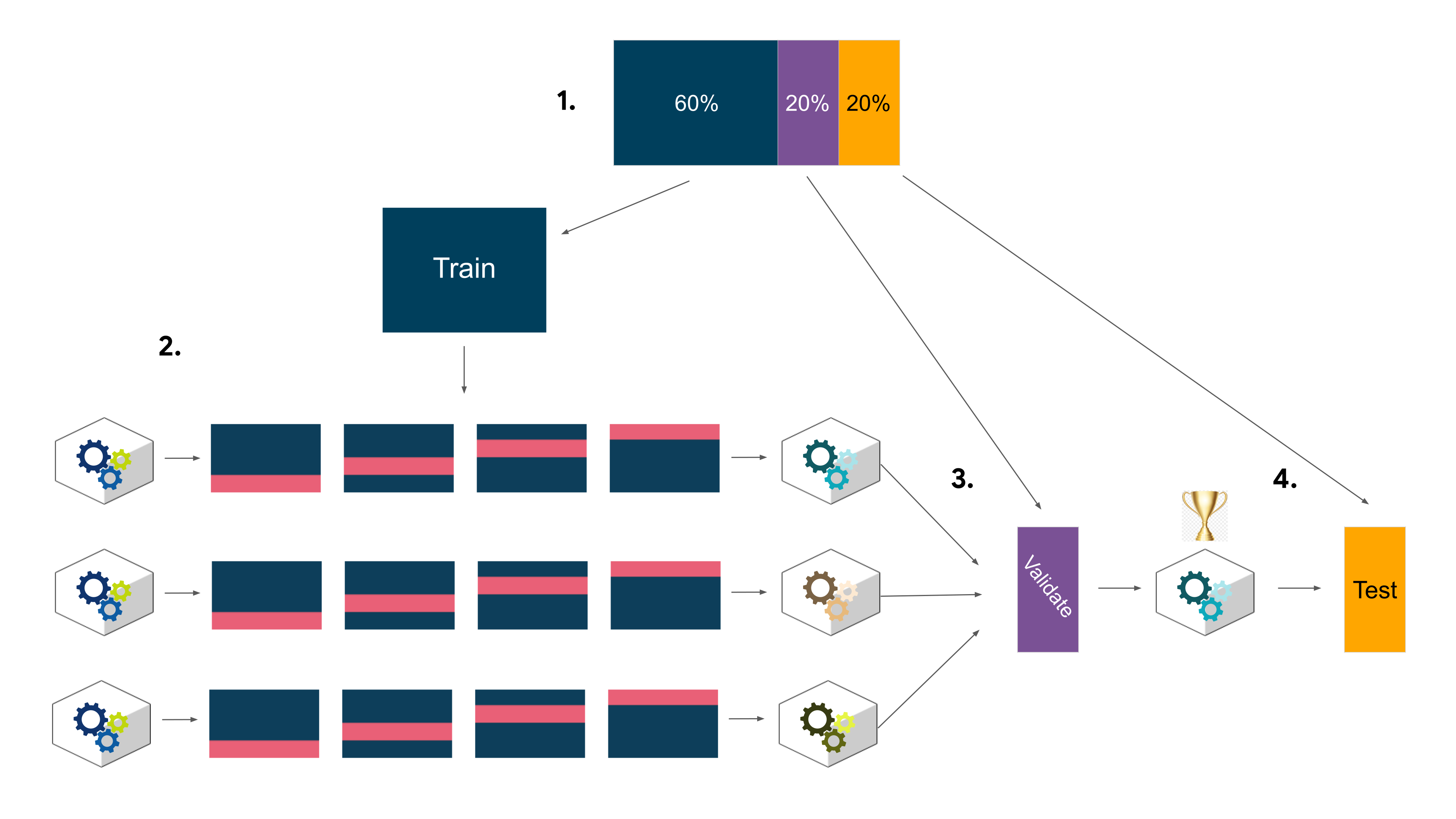
Now you're ready to model. The only remaining step is to split the data into features/target variable and training/validation/test sets.
Define a variable X that isolates the features. Remember not to use device.
Define a variable y that isolates the target variable (label2).
Split the data 80/20 into an interim training set and a test set. Don't forget to stratify the splits, and set the random state to 42.
Split the interim training set 75/25 into a training set and a validation set, yielding a final ratio of 60/20/20 for training/validation/test sets. Again, don't forget to stratify the splits and set the random state.
# 1. Isolate X variables
X = df.drop(columns= ['label','label2','device'])

# 2. Isolate y variable
y = df['label2']

# 3. Split into train and test sets
X_train, X_test, y_train, y_test = train_test_split( X, y, test_size = 0.20, stratify = y , random_state =42)

# 4. Split into train and validate sets
X_tr, X_val, y_tr, y_val = train_test_split(X_train, y_train, test_size = 0.25, stratify = y_train, random_state = 42)
for x in [X_tr, X_val, X_test]:
    print(len(x))
8579
2860
2860
This aligns with expectations.
Begin with using GridSearchCV to tune a random forest model.
Instantiate the random forest classifier rf and set the random state.
Create a dictionary cv_params of any of the following hyperparameters and their corresponding values to tune. The more you tune, the better your model will fit the data, but the longer it will take.
max_depthmax_featuresmax_samplesmin_samples_leafmin_samples_splitn_estimatorsDefine a dictionary scoring of scoring metrics for GridSearch to capture (precision, recall, F1 score, and accuracy).
Instantiate the GridSearchCV object rf_cv. Pass to it as arguments:
rfcv_paramsscoringcv=_)refit=_)refit should be set to 'recall'.
Note: To save time, this exemplar doesn't use multiple values for each parameter in the grid search, but you should include a range of values in your search to home in on the best set of parameters.
# 1. Instantiate the random forest classifier
rf = RandomForestClassifier(random_state = 42)

# 2. Create a dictionary of hyperparameters to tune
cv_params = {
    'max_depth':[None],
    'max_features':[1.0],
    'max_samples':[1.0],
    'min_samples_leaf':[2],
    'min_samples_split':[2],
    'n_estimators':[200,100,300]
}

# 3. Define a dictionary of scoring metrics to capture
scoring = {'accuracy','precision','recall','f1'}

# 4. Instantiate the GridSearchCV object
rf_cv = GridSearchCV(rf, cv_params, scoring = scoring, cv =4, refit = 'recall')
Now fit the model to the training data.
### YOUR CODE HERE ###


rf_cv.fit(X_tr, y_tr)
GridSearchCV(cv=4, estimator=RandomForestClassifier(random_state=42),
             param_grid={'max_depth': [None], 'max_features': [1.0],
                         'max_samples': [1.0], 'min_samples_leaf': [2],
                         'min_samples_split': [2],
                         'n_estimators': [200, 100, 300]},
             refit='recall', scoring={'recall', 'accuracy', 'precision', 'f1'})
In a Jupyter environment, please rerun this cell to show the HTML representation or trust the notebook. GridSearchCV(cv=4, estimator=RandomForestClassifier(random_state=42),
param_grid={'max_depth': [None], 'max_features': [1.0],
'max_samples': [1.0], 'min_samples_leaf': [2],
'min_samples_split': [2],
'n_estimators': [200, 100, 300]},
refit='recall', scoring={'recall', 'accuracy', 'precision', 'f1'})RandomForestClassifier(random_state=42)
RandomForestClassifier(random_state=42)
Examine the best average score across all the validation folds.
# Examine best score
rf_cv.best_score_
0.12941359303771238
Examine the best combination of hyperparameters.
# Examine best hyperparameter combo
rf_cv.best_params_
{'max_depth': None,
 'max_features': 1.0,
 'max_samples': 1.0,
 'min_samples_leaf': 2,
 'min_samples_split': 2,
 'n_estimators': 200}
Use the make_results() function to output all of the scores of your model. Note that the function accepts three arguments.
To learn more about how this function accesses the cross-validation results, refer to the GridSearchCV scikit-learn documentation for the cv_results_ attribute.
def make_results(model_name:str, model_object, metric:str):
    '''
    Arguments:
        model_name (string): what you want the model to be called in the output table
        model_object: a fit GridSearchCV object
        metric (string): precision, recall, f1, or accuracy

    Returns a pandas df with the F1, recall, precision, and accuracy scores
    for the model with the best mean 'metric' score across all validation folds.
    '''


    # Create dictionary that maps input metric to actual metric name in GridSearchCV
    metric_dict = {'precision':'mean_test_precision',
                 'recall':'mean_test_recall',
                 'f1':'mean_test_recall',
                 'accuracy':'mean_test_accuracy'}


  # Get all the results from the CV and put them in a df
    cv_results = pd.DataFrame(model_object.cv_results_)

  # Isolate the row of the df with the max(metric) score
    best_estimator_results = cv_results.iloc[cv_results[metric_dict[metric]].idxmax(),:]

  # Extract Accuracy, precision, recall, and f1 score from that row
    f1 = best_estimator_results.mean_test_f1
    recall = best_estimator_results.mean_test_recall
    accuracy= best_estimator_results.mean_test_accuracy
    precision = best_estimator_results.mean_test_precision

  # Create table of results
    table = pd.DataFrame({'model':[model_name],
                        'precision':[precision],
                        'recall':[recall],
                        'f1':[f1],
                        'accuracy':[accuracy]})

    return table
Pass the GridSearch object to the make_results() function.
### YOUR CODE HERE ###
results = make_results('RF cv', rf_cv, 'recall')
results
| model | precision | recall | f1 | accuracy | |
|---|---|---|---|---|---|
| 0 | RF cv | 0.451089 | 0.129414 | 0.200945 | 0.817577 |
Asside from the accuracy, the scores aren't that good. However, recall that when you built the logistic regression model in the last course the recall was ~0.09, which means that this model has 33% better recall and about the same accuracy, and it was trained on less data.
If you want, feel free to try retuning your hyperparameters to try to get a better score. You might be able to marginally improve the model.
Try to improve your scores using an XGBoost model.
Instantiate the XGBoost classifier xgb and set objective='binary:logistic'. Also set the random state.
Create a dictionary cv_params of the following hyperparameters and their corresponding values to tune:
max_depthmin_child_weightlearning_raten_estimatorsDefine a dictionary scoring of scoring metrics for grid search to capture (precision, recall, F1 score, and accuracy).
Instantiate the GridSearchCV object xgb_cv. Pass to it as arguments:
xgbcv_paramsscoringcv=_)refit='recall')# 1. Instantiate the XGBoost classifier
xgb = XGBClassifier(objective='binary:logistic', random_state=42)
# 2. Create a dictionary of hyperparameters to tune
cv_params = {'max_depth':[2],
'min_child_weight':[1,2],
'learning_rate':[0.7],
'n_estimators':[200]}
# 3. Define a dictionary of scoring metrics to capture
scoring = {'accuracy','precision','recall','f1'}
# 4. Instantiate the GridSearchCV object
xgb_cv = GridSearchCV(xgb, cv_params, scoring= scoring, cv =5, refit = 'recall')
Now fit the model to the X_train and y_train data.
Note this cell might take several minutes to run.
### YOUR CODE HERE ###
xgb_cv.fit(X_tr, y_tr)
GridSearchCV(cv=5,
             estimator=XGBClassifier(base_score=None, booster=None,
                                     callbacks=None, colsample_bylevel=None,
                                     colsample_bynode=None,
                                     colsample_bytree=None,
                                     early_stopping_rounds=None,
                                     enable_categorical=False, eval_metric=None,
                                     feature_types=None, gamma=None,
                                     gpu_id=None, grow_policy=None,
                                     importance_type=None,
                                     interaction_constraints=None,
                                     learning_rate=None,...
                                     max_delta_step=None, max_depth=None,
                                     max_leaves=None, min_child_weight=None,
                                     missing=nan, monotone_constraints=None,
                                     n_estimators=100, n_jobs=None,
                                     num_parallel_tree=None, predictor=None,
                                     random_state=42, ...),
             param_grid={'learning_rate': [0.7], 'max_depth': [2],
                         'min_child_weight': [1, 2], 'n_estimators': [200]},
             refit='recall', scoring={'recall', 'accuracy', 'precision', 'f1'})
In a Jupyter environment, please rerun this cell to show the HTML representation or trust the notebook. GridSearchCV(cv=5,
estimator=XGBClassifier(base_score=None, booster=None,
callbacks=None, colsample_bylevel=None,
colsample_bynode=None,
colsample_bytree=None,
early_stopping_rounds=None,
enable_categorical=False, eval_metric=None,
feature_types=None, gamma=None,
gpu_id=None, grow_policy=None,
importance_type=None,
interaction_constraints=None,
learning_rate=None,...
max_delta_step=None, max_depth=None,
max_leaves=None, min_child_weight=None,
missing=nan, monotone_constraints=None,
n_estimators=100, n_jobs=None,
num_parallel_tree=None, predictor=None,
random_state=42, ...),
param_grid={'learning_rate': [0.7], 'max_depth': [2],
'min_child_weight': [1, 2], 'n_estimators': [200]},
refit='recall', scoring={'recall', 'accuracy', 'precision', 'f1'})XGBClassifier(base_score=None, booster=None, callbacks=None,
colsample_bylevel=None, colsample_bynode=None,
colsample_bytree=None, early_stopping_rounds=None,
enable_categorical=False, eval_metric=None, feature_types=None,
gamma=None, gpu_id=None, grow_policy=None, importance_type=None,
interaction_constraints=None, learning_rate=None, max_bin=None,
max_cat_threshold=None, max_cat_to_onehot=None,
max_delta_step=None, max_depth=None, max_leaves=None,
min_child_weight=None, missing=nan, monotone_constraints=None,
n_estimators=100, n_jobs=None, num_parallel_tree=None,
predictor=None, random_state=42, ...)XGBClassifier(base_score=None, booster=None, callbacks=None,
colsample_bylevel=None, colsample_bynode=None,
colsample_bytree=None, early_stopping_rounds=None,
enable_categorical=False, eval_metric=None, feature_types=None,
gamma=None, gpu_id=None, grow_policy=None, importance_type=None,
interaction_constraints=None, learning_rate=None, max_bin=None,
max_cat_threshold=None, max_cat_to_onehot=None,
max_delta_step=None, max_depth=None, max_leaves=None,
min_child_weight=None, missing=nan, monotone_constraints=None,
n_estimators=100, n_jobs=None, num_parallel_tree=None,
predictor=None, random_state=42, ...)Get the best score from this model.
# Examine best score
xgb_cv.best_score_
0.19382010353753235
And the best parameters.
# Examine best parameters
xgb_cv.best_params_
{'learning_rate': 0.7,
 'max_depth': 2,
 'min_child_weight': 2,
 'n_estimators': 200}
Use the make_results() function to output all of the scores of your model. Note that the function accepts three arguments.
# Call 'make_results()' on the GridSearch object

xgb_cv_results = make_results("XGB cv", xgb_cv, 'recall')

results = pd.concat([results, xgb_cv_results], axis =0)
results
| model | precision | recall | f1 | accuracy | |
|---|---|---|---|---|---|
| 0 | RF cv | 0.451089 | 0.129414 | 0.200945 | 0.817577 |
| 0 | XGB cv | 0.413969 | 0.193820 | 0.263520 | 0.808136 |
This model fit the data even better than the random forest model. The recall score is nearly double the recall score from the logistic regression model from the previous course, and it's almost 50% better than the random forest model's recall score, while maintaining a similar accuracy and precision score.
Now, use the best random forest model and the best XGBoost model to predict on the validation data. Whichever performs better will be selected as the champion model.
# Use random forest model to predict on validation data
rf_val_preds = rf_cv.best_estimator_.predict(X_val)
Use the get_test_scores() function to generate a table of scores from the predictions on the validation data.
def get_test_scores(model_name:str, preds, y_test_data):
    accuracy = metrics.accuracy_score(y_test_data, preds)
    precision = metrics.precision_score(y_test_data, preds)
    recall = metrics.recall_score(y_test_data, preds)
    f1 = metrics.f1_score(y_test_data, preds)

    table = pd.DataFrame({'model': [model_name],
                          'precision': [precision],
                          'recall': [recall],
                          'F1': [f1],
                          'accuracy': [accuracy],
                          })

    return table

    '''
    Generate a table of test scores.

    In:
        model_name (string): Your choice: how the model will be named in the output table
        preds: numpy array of test predictions
        y_test_data: numpy array of y_test data

    Out:
        table: a pandas df of precision, recall, f1, and accuracy scores for your model
    '''
# Get validation scores for RF model
rf_val_scores = get_test_scores('RF val', rf_val_preds, y_val)

# Append to the results table
results = pd.concat([results, rf_val_scores], axis=0)
results
| model | precision | recall | f1 | accuracy | F1 | |
|---|---|---|---|---|---|---|
| 0 | RF cv | 0.451089 | 0.129414 | 0.200945 | 0.817577 | NaN |
| 0 | XGB cv | 0.413969 | 0.193820 | 0.263520 | 0.808136 | NaN |
| 0 | RF val | 0.466667 | 0.138067 | NaN | 0.819231 | 0.21309 |
| 0 | RF val | 0.466667 | 0.138067 | NaN | 0.819231 | 0.21309 |
Notice that the scores went down from the training scores across all metrics, but only by very little. This means that the model did not overfit the training data.
Now, do the same thing to get the performance scores of the XGBoost model on the validation data.
# Use XGBoost model to predict on validation data
xgb_val_preds = xgb_cv.best_estimator_.predict(X_val)

# Get validation scores for XGBoost model
xgb_val_scores = get_test_scores('XGB val', xgb_val_preds, y_val)

# Append to the results table
results = pd.concat([results, xgb_val_scores], axis=0)
results
| model | precision | recall | f1 | accuracy | F1 | |
|---|---|---|---|---|---|---|
| 0 | RF cv | 0.451089 | 0.129414 | 0.200945 | 0.817577 | NaN |
| 0 | XGB cv | 0.413969 | 0.193820 | 0.263520 | 0.808136 | NaN |
| 0 | RF val | 0.466667 | 0.138067 | NaN | 0.819231 | 0.213090 |
| 0 | RF val | 0.466667 | 0.138067 | NaN | 0.819231 | 0.213090 |
| 0 | XGB val | 0.386364 | 0.167653 | NaN | 0.805245 | 0.233838 |
Just like with the random forest model, the XGBoost model's validation scores were lower, but only very slightly. It is still the clear champion.

Consider the questions in your PACE Strategy Document to reflect on the Execute stage.
Now, use the champion model to predict on the test dataset. This is to give a final indication of how you should expect the model to perform on new future data, should you decide to use the model.
# Use XGBoost model to predict on test data
xgb_test_pred = xgb_cv.best_estimator_.predict(X_test)

# Get test scores for XGBoost model
xgb_test_scores = get_test_scores('XGB test', xgb_test_pred, y_test)

# Append to the results table
results = pd.concat([results, xgb_test_scores], axis=0)
results
| model | precision | recall | f1 | accuracy | F1 | |
|---|---|---|---|---|---|---|
| 0 | RF cv | 0.451089 | 0.129414 | 0.200945 | 0.817577 | NaN |
| 0 | XGB cv | 0.413969 | 0.193820 | 0.263520 | 0.808136 | NaN |
| 0 | RF val | 0.466667 | 0.138067 | NaN | 0.819231 | 0.213090 |
| 0 | RF val | 0.466667 | 0.138067 | NaN | 0.819231 | 0.213090 |
| 0 | XGB val | 0.386364 | 0.167653 | NaN | 0.805245 | 0.233838 |
| 0 | XGB test | 0.359307 | 0.163708 | NaN | 0.800000 | 0.224932 |
The recall was exactly the same as it was on the validation data, but the precision declined notably, which caused all of the other scores to drop slightly. Nonetheless, this is stil within the acceptable range for performance discrepancy between validation and test scores.
Plot a confusion matrix of the champion model's predictions on the test data.
# Generate array of values for confusion matrix
cm = metrics.confusion_matrix( y_test, xgb_test_pred, labels = xgb_cv.classes_)

# Plot confusion matrix
disp = metrics.ConfusionMatrixDisplay( confusion_matrix = cm,
                                       display_labels = ['retained','churned'])

disp.plot();

The model predicted three times as many false negatives than it did false positives, and it correctly identified only 16.6% of the users who actually churned.
Use the plot_importance function to inspect the most important features of your final model.
### YOUR CODE HERE ###

plot_importance(xgb_cv.best_estimator_);

The XGBoost model made more use of many of the features than did the logistic regression model from the previous course, which weighted a single feature (activity_days) very heavily in its final prediction.
If anything, this underscores the importance of feature engineering. Notice that engineered features accounted for six of the top 10 features (and three of the top five). Feature engineering is often one of the best and easiest ways to boost model performance.
Also, note that the important features in one model might not be the same as the important features in another model. That's why you shouldn't discount features as unimportant without thoroughly examining them and understanding their relationship with the dependent variable, if possible. These discrepancies between features selected by models are typically caused by complex feature interactions.
Remember, sometimes your data simply will not be predictive of your chosen target. This is common. Machine learning is a powerful tool, but it is not magic. If your data does not contain predictive signal, even the most complex algorithm will not be able to deliver consistent and accurate predictions. Do not be afraid to draw this conclusion.
Even if you cannot use the model to make strong predictions, was the work done in vain? What insights can you report back to stakeholders?
Now that you've built and tested your machine learning models, the next step is to share your findings with the Waze leadership team. Consider the following questions as you prepare to write your executive summary. Think about key points you may want to share with the team, and what information is most relevant to the user churn project.
Questions:
Would you recommend using this model for churn prediction? Why or why not?
What tradeoff was made by splitting the data into training, validation, and test sets as opposed to just training and test sets?
What is the benefit of using a logistic regression model over an ensemble of tree-based models (like random forest or XGBoost) for classification tasks?
What is the benefit of using an ensemble of tree-based models like random forest or XGBoost over a logistic regression model for classification tasks?
What could you do to improve this model?
What additional features would you like to have to help improve the model?
==> ENTER YOUR RESPONSES TO QUESTIONS 1-6 HERE
The following content is not required, but demonstrates further steps that you might take to tailor your model to your use case.
The default decision threshold for most implementations of classification algorithms—including scikit-learn's—is 0.5. This means that, in the case of the Waze models, if they predicted that a given user had a 50% probability or greater of churning, then that user was assigned a predicted value of 1—the user was predicted to churn.
With imbalanced datasets where the response class is a minority, this threshold might not be ideal. You learned that a precision-recall curve can help to visualize the trade-off between your model's precision and recall.
Here's the precision-recall curve for the XGBoost champion model on the test data.
# Plot precision-recall curve
display = metrics.PrecisionRecallDisplay.from_estimator(xgb_cv.best_estimator_, X_test, y_test, name='XGboost')
plt.title("Precision-recall Curve, XGboost model")
Text(0.5, 1.0, 'Precision-recall Curve, XGboost model')

As recall increases, precision decreases. But what if you determined that false positives aren't much of a problem? For example, in the case of this Waze project, a false positive could just mean that a user who will not actually churn gets an email and a banner notification on their phone. It's very low risk.
So, what if instead of using the default 0.5 decision threshold of the model, you used a lower threshold?
Here's an example where the threshold is set to 0.4:
# Get predicted probabilities on the test data
predicted_probabilities = xgb_cv.best_estimator_.predict_proba(X_test)
predicted_probabilities
array([[0.83909667, 0.16090332],
       [0.59840745, 0.40159255],
       [0.90512574, 0.09487425],
       ...,
       [0.6728308 , 0.32716915],
       [0.97635394, 0.02364605],
       [0.8399014 , 0.1600986 ]], dtype=float32)
The predict_proba() method returns a 2-D array of probabilities where each row represents a user. The first number in the row is the probability of belonging to the negative class, the second number in the row is the probability of belonging to the positive class. (Notice that the two numbers in each row are complimentary to each other and sum to one.)
You can generate new predictions based on this array of probabilities by changing the decision threshold for what is considered a positive response. For example, the following code converts the predicted probabilities to {0, 1} predictions with a threshold of 0.4. In other words, any users who have a value ≥ 0.4 in the second column will get assigned a prediction of 1, indicating that they churned.
# Create a list of just the second column values (probability of target)
probs = [x[1] for x in predicted_probabilities]

# Create an array of new predictions that assigns a 1 to any value >= 0.4
new_preds = np.array([1 if x >= 0.4 else 0 for x in probs])
new_preds
array([0, 1, 0, ..., 0, 0, 0])
# Get evaluation metrics for when the threshold is 0.4
### YOUR CODE HERE ###
Compare these numbers with the results from earlier.
### YOUR CODE HERE ###

get_test_scores('XGB, threshold = 0.4', new_preds, y_test)
| model | precision | recall | F1 | accuracy | |
|---|---|---|---|---|---|
| 0 | XGB, threshold = 0.4 | 0.357895 | 0.268245 | 0.306652 | 0.784965 |
results
| model | precision | recall | f1 | accuracy | F1 | |
|---|---|---|---|---|---|---|
| 0 | RF cv | 0.451089 | 0.129414 | 0.200945 | 0.817577 | NaN |
| 0 | XGB cv | 0.413969 | 0.193820 | 0.263520 | 0.808136 | NaN |
| 0 | RF val | 0.466667 | 0.138067 | NaN | 0.819231 | 0.213090 |
| 0 | RF val | 0.466667 | 0.138067 | NaN | 0.819231 | 0.213090 |
| 0 | XGB val | 0.386364 | 0.167653 | NaN | 0.805245 | 0.233838 |
| 0 | XGB test | 0.359307 | 0.163708 | NaN | 0.800000 | 0.224932 |
Recall and F1 score increased significantly, while precision and accuracy decreased.
So, using the precision-recall curve as a guide, suppose you knew that you'd be satisfied if the model had a recall score of 0.5 and you were willing to accept the ~30% precision score that comes with it. In other words, you'd be happy if the model successfully identified half of the people who will actually churn, even if it means that when the model says someone will churn, it's only correct about 30% of the time.
What threshold will yield this result? There are a number of ways to determine this. Here's one way that uses a function to accomplish this.
def threshold_finder(y_test_data, probabilities, desired_recall):
    '''
    Find the threshold that most closely yields a desired recall score.

    Inputs:
        y_test_data: Array of true y values
        probabilities: The results of the `predict_proba()` model method
        desired_recall: The recall that you want the model to have

    Outputs:
        threshold: The threshold that most closely yields the desired recall
        recall: The exact recall score associated with `threshold`
    '''
    probs = [x[1] for x in probabilities]  # Isolate second column of `probabilities`
    thresholds = np.arange(0, 1, 0.001)    # Set a grid of 1,000 thresholds to test

    scores = []
    for threshold in thresholds:
        # Create a new array of {0, 1} predictions based on new threshold
        preds = np.array([1 if x >= threshold else 0 for x in probs])
        # Calculate recall score for that threshold
        recall = metrics.recall_score(y_test_data, preds)
        # Append the threshold and its corresponding recall score as a tuple to `scores`
        scores.append((threshold, recall))

    distances = []
    for idx, score in enumerate(scores):
        # Calculate how close each actual score is to the desired score
        distance = abs(score[1] - desired_recall)
        # Append the (index#, distance) tuple to `distances`
        distances.append((idx, distance))

    # Sort `distances` by the second value in each of its tuples (least to greatest)
    sorted_distances = sorted(distances, key=lambda x: x[1], reverse=False)
    # Identify the tuple with the actual recall closest to desired recall
    best = sorted_distances[0]
    # Isolate the index of the threshold with the closest recall score
    best_idx = best[0]
    # Retrieve the threshold and actual recall score closest to desired recall
    threshold, recall = scores[best_idx]

    return threshold, recall
Now, test the function to find the threshold that results in a recall score closest to 0.5.
# Get the predicted probabilities from the champion model
probabilities = xgb_cv.best_estimator_.predict_proba(X_test)

# Call the function
threshold_finder(y_test, probabilities, 0.5)
(0.211, 0.5009861932938856)
Setting a threshold of 0.124 will result in a recall of 0.503.
To verify, you can repeat the steps performed earlier to get the other evaluation metrics for when the model has a threshold of 0.124. Based on the precision-recall curve, a 0.5 recall score should have a precision of ~0.3.
# Create an array of new predictions that assigns a 1 to any value >= 0.124
probs = [x[1] for x in probabilities]
new_preds = np.array([1 if x >= 0.124 else 0 for x in probs])

# Get evaluation metrics for when the threshold is 0.124
get_test_scores('XGB, threshold = 0.124', new_preds, y_test)
| model | precision | recall | F1 | accuracy | |
|---|---|---|---|---|---|
| 0 | XGB, threshold = 0.124 | 0.265146 | 0.664694 | 0.379078 | 0.613986 |
It worked! Hopefully now you understand that changing the decision threshold is another tool that can help you achieve useful results from your model.
Congratulations! You've completed this lab. However, you may not notice a green check mark next to this item on Coursera's platform. Please continue your progress regardless of the check mark. Just click on the "save" icon at the top of this notebook to ensure your work has been logged.